
The Human Layer Between Business Data and Software Is Becoming AI Work
Articles are currently available in English only.
A furniture quotation arrives by email. The workbook has a customer and project at the top, followed by a product list. Pictures sit beside the products they describe. Room names divide the list into groups. A buyer can open it and discuss designs, quantities, and delivery. As a business document, it works.
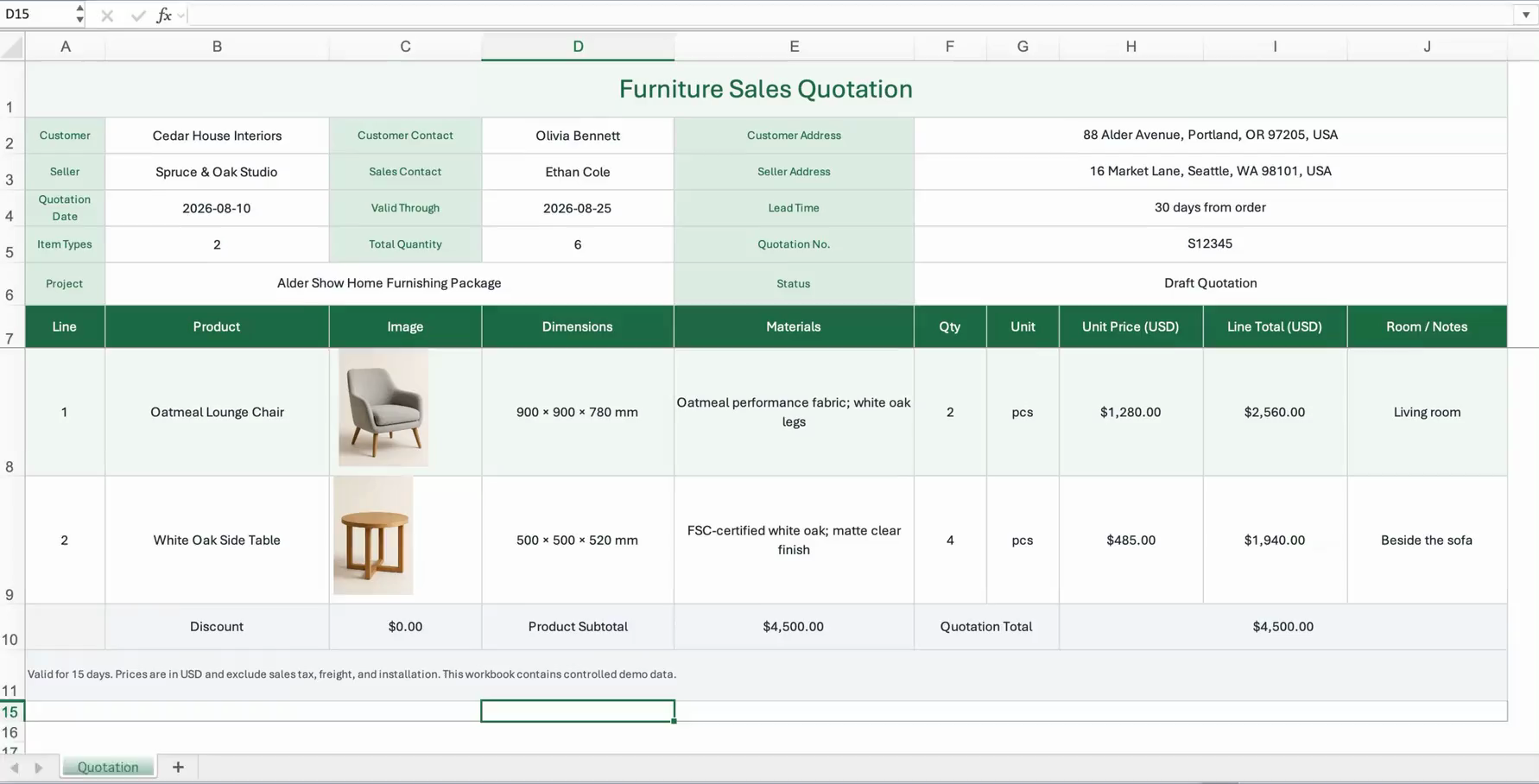
A business-ready quotation can combine document-level facts, line items, images, quantities, prices, and room context in one human-readable layout.
Now someone has to enter it into the ERP.
The system wants the same quotation expressed differently: a main record, a set of line items, and links to customers and products. Names in the file need to resolve to records. The product list needs to become line items. Room groupings and pictures need somewhere to go in the target model.
The workbook was arranged for people to read and share. The system needs explicit objects, fields, and relationships. The meaning in the source can be perfectly clear while still being in the wrong form for the destination.
For a long time, a person has supplied the missing adaptation.
Traditional import workflows have largely relied on users to interpret the file. Someone first expresses its contents in a form the software can process. Then the software can check the data and act on it.
That person might be an operations assistant, an implementation consultant, or an engineer writing an import script. They look at the file and the target system, work out what the file means, and decide how its contents should fit. We often call this "data cleanup," which hides much of the judgment involved.
The customer name appears once at the top but describes the whole quotation. Each product row has its own quantity and price. A room heading applies to several products below it. A person reads labels, positions, and groups, then translates them into a main record, line items, and fields.
A customer relationship adds another step. The file names the recipient of the quotation; the system needs the identifier of a customer record. The operator uses the available records to find the match and link it to the quotation. Pictures require a similar translation. Labels and placement establish which product a picture belongs to, but the target system determines how to attach it to a product or line item.
Together, these decisions form a source-to-target mapping specification. An import template, a field mapping, or a script can encode that specification: which source contents should become which objects, fields, and relationships. Software can then read the values, look up records, and perform the writes.
Reading the file accurately leaves this work unfinished. We may have all the contents without yet knowing how the target system should use them.
Import tools can support complex objects, attachments, lookups, and validation. Templates and scripts can settle many mappings in advance. A fixed template specifies where the customer goes, which rows contain line items, and which identifier to use for products. When sources follow those conventions, the rest can run directly. This works well for stable inputs.
Business files also serve people outside the software. Suppliers have their own catalog formats. Customers arrange quotations differently. Project teams may group products by room or move a shared note to the top. Those choices can improve the document for its readers while requiring someone to revisit its mapping to the target.
The adaptation work persists. It happens before import, while preparing a template, configuring a mapping, or writing a script. It also happens after an attempt fails: someone reads the error, returns to the file, and revises the plan.
Tools provide previews, candidate records, and check results. A person decides where to look, what the feedback means, and what to change next. Changing one mapping may require checking several others. The person connects the operations and keeps the task moving.
A selection in an import wizard can look like a simple interface action. Behind it may be a judgment the software has left to the user. Templates, mapping screens, and configuration options turn those judgments into questions people must answer. After a while, we treat them as necessary steps in using the software. We rarely ask why someone has to do them by hand.
This investigation and judgment is work AI can begin to take on.
A model can use form labels to identify the customer for the quotation, use headings and groups to locate the line items, and compare those contents with the target's object and field definitions. A different layout requires fresh interpretation. The questions remain specific: what belongs to the main record, what forms a line item, and where should each part go?
The target gives those judgments a purpose. Reading a name identifies a customer in the document. Knowing that the target field links to a customer object tells us which relationship the name must establish. The source, target definitions, and available business records supply the evidence.
The user's rules belong in the task too. If several customer records match, the user may require confirmation. The model's familiarity with common business practices does not authorize it to choose one. It can investigate further, leave settled rules to software, and identify what remains unresolved when the evidence is insufficient.
Its decisions can be recorded explicitly: "This region contains quotation lines. This column supplies unit prices. This position in the header supplies the customer." Each decision points to a source and a destination. If the model picks the wrong column, a reviewer can inspect the mapping. If a field constraint fails, the software can point back to the relevant decision for further investigation.
An inspectable decision can still be wrong. The gain is that work once scattered across someone's actions now has an explicit form. Software can act on it, and people can review it.
Connect those decisions to tools for lookup, execution, and checking, and steps once performed by the user can move inside the software. The user supplies the file, destination, and requirements. The model and software carry out the adaptation, respond to feedback, ask for confirmation when needed, and report what succeeded and what remains open.
The user can begin to delegate. They previously had to translate a goal into a sequence of operations the software would accept. Now they can ask the software to take on that translation and follow it through. A chat interface alone does not make this happen. If someone still has to direct every read, every mapping change, and every query, they still own the work of organizing the task.
This changes how we judge the progress of automation.
Suppose AI has turned the quotation into a clean table, preserving the customer, products, groups, and pictures. That saves work. But if the goal is to import it into a particular system, someone may still have to decide how to link the customer, organize the line items, and attach the pictures. The target adaptation is still waiting.
A clean intermediate table does not automatically contain those answers. The same business document may need different objects and relationships in different systems. Bringing the destination into the task lets automation proceed from identifying what the file contains to deciding how this system should use it.
When the next file arrives, how much interpretation and translation must a person repeat? That is a useful measure. Extracting the contents and cleaning up the table are valuable steps. Establishing the source-to-target correspondence determines how much adaptation work remains.
This work hides in ordinary requests: "Clean up this spreadsheet." "Set up the mapping." "Help the customer import it." Sometimes it looks like data entry, sometimes implementation services, sometimes a small script. Because it happens around the edges of using software, we tend to treat it as preparation and cleanup the user owes the system.
Similar work is scattered across many jobs: arranging information before filling in a form, converting it before starting an operation, expressing it again for another system. The goal is already clear. Someone still has to interpret and translate it before software can act.
An import makes this labor visible. The user wants the quotation in the target system. Preparing a template, configuring mappings, and resolving relationships are work incurred to get there. As software takes on the judgments and carries them through, some of that work can disappear from the user's list.
AI is turning some of the work required to use software into a service the software can provide.